
“`html
How to Set Up a Security Camera in an Apartment: Step-by-Step 2026 Edition
Living in an apartment offers convenience and community, but it also comes with unique challenges when it comes to security. Unlike homeowners, renters often face restrictions on modifications, drilling holes, and making permanent changes to their living space. Yet, the desire for peace of mind and protection for loved ones and belongings remains paramount. This comprehensive guide will walk you through the process of setting up a security camera in your apartment in 2026, focusing on renter-friendly solutions that offer robust surveillance without violating your lease agreement.
We’ll cover everything from choosing the right camera to installation techniques, ensuring you can enhance your apartment’s security effectively and without hassle. Get ready to transform your apartment into a safer haven!
Choosing the Right Security Camera for Your Apartment
The first step in any successful security setup is selecting the appropriate equipment. For apartment dwellers, certain features are far more important than others.
Key Considerations for Apartment Security Cameras:
- No-Drill Installation: This is arguably the most critical feature for renters. Look for cameras that rely on adhesive mounts, magnetic bases, or innovative clamping mechanisms that don’t require power tools or leave permanent marks.
- Wireless Connectivity: Most modern security cameras are wireless, connecting to your home Wi-Fi network. This eliminates the need for messy Ethernet cables and simplifies placement.
- Privacy Features: Given the close proximity of neighbors in apartments, privacy is a significant concern. Opt for cameras with privacy shutters, deactivation schedules, or activity zones that can exclude common areas or neighbor’s property from surveillance.
- Power Source: Battery-powered cameras offer ultimate flexibility in placement but require periodic recharging. Wired cameras offer continuous power but limit placement to near an outlet. Some innovative solutions, like window-mounted cameras, can sometimes use solar power or draw power from unique sources.
- Video Quality & Night Vision: For effective monitoring, aim for at least 1080p resolution. Night vision is crucial for monitoring low-light conditions, and advanced options like 4K night vision or color night vision offer superior clarity.
- Two-Way Audio: This allows you to communicate with visitors or deter intruders, even when you’re not home.
- Motion Detection & Alerts: Customizable motion zones and intelligent alerts reduce false alarms and ensure you’re notified only when it matters.
- Local vs. Cloud Storage: Consider how you want to store your footage. Local storage (SD card) offers privacy and no recurring fees, while cloud storage provides off-site backup, often with subscription costs.
Indoor vs. Outdoor Apartment Cameras
The distinction between indoor and outdoor cameras is important, especially for renters. While traditional outdoor cameras might be difficult to install on an apartment’s exterior, indoor cameras can often serve a similar purpose when positioned strategically.
| Scenario | Best Camera Type/Feature | Why it Works for Renters |
|---|---|---|
| Monitoring your front door/hallway from inside | Indoor camera with wide-angle lens, PIR motion detection | Placed on a shelf or adhesive plate near the door, captures activity without external modification. |
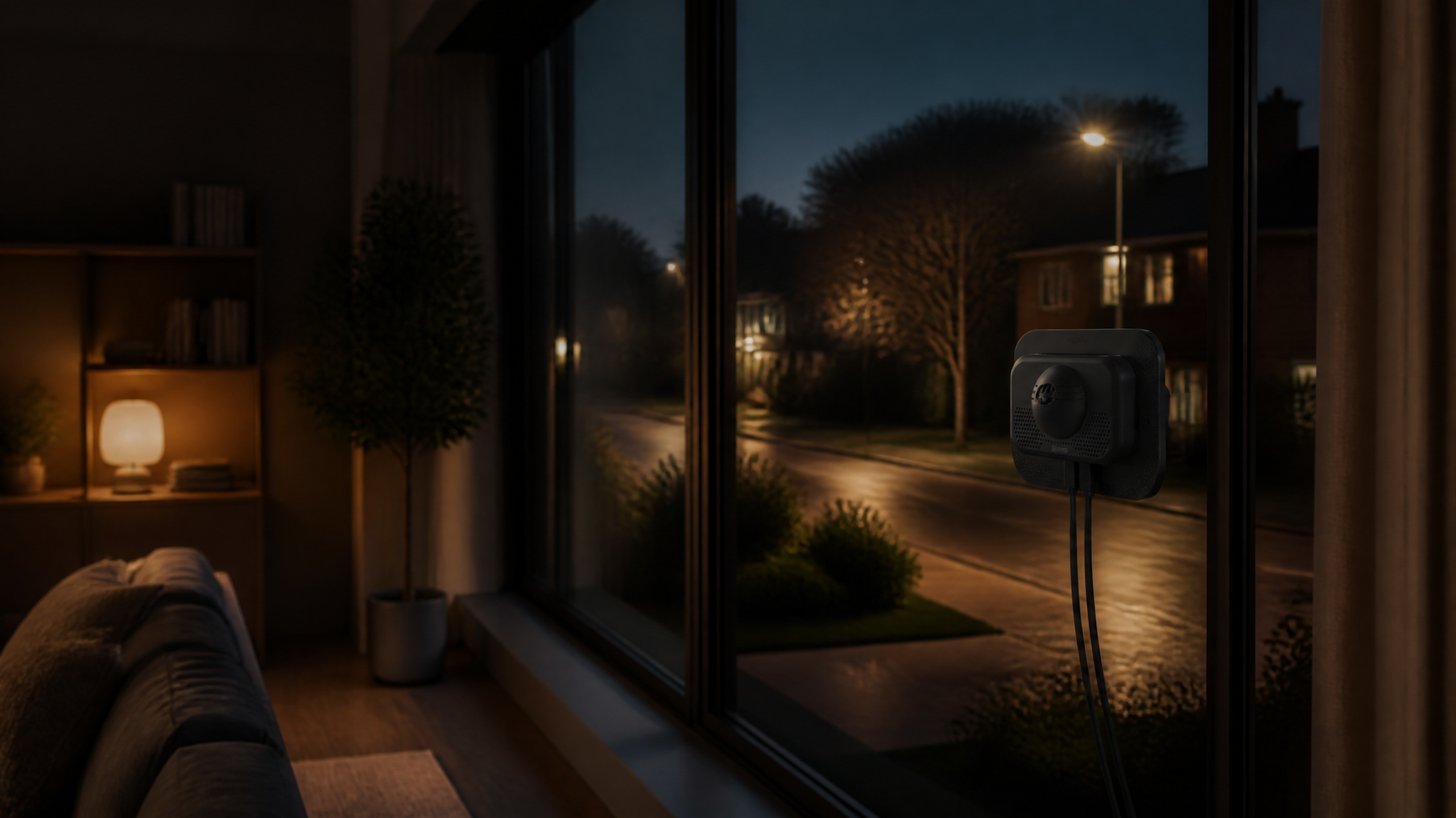
| Monitoring your balcony/patio without external mounting | Window-mounted camera (e.g., ShowMo WinEye), weatherproof indoor camera facing out | No drilling required; protects from elements while providing outside view. |
| General indoor surveillance (pets, packages, entry points) | Pan-tilt-zoom (PTZ) indoor camera, strategically placed fixed camera | Versatile placement on furniture, simple to move, covers broad areas. |
| Temporary security (travel, short-term need) | Battery-powered wireless camera, plug-and-play setup | Easy to deploy and remove, no long-term commitment. |
Planning Your Apartment Security Camera Placement
Effective camera placement is crucial for maximizing coverage and minimizing blind spots, all while respecting privacy and lease agreements.
Strategic Indoor Placement Ideas:
- Near the Main Entry Door: This is a primary point of entry. A camera facing the door can capture anyone coming or going.
- Windows Overlooking Exterior Areas: If you have a patio, balcony, or ground-floor window, a camera facing outwards can monitor these vulnerable spots. This is where advanced solutions like window-mounted cameras truly shine.
- Overlooking Valuables: If you have specific areas with high-value items (e.g., electronics, jewelry), consider a camera with a direct line of sight.
- Hallways or Common Paths: A camera positioned at the end of a hallway can monitor movement between rooms.
Respecting Privacy & Lease Agreements:
Always review your lease agreement for any specific clauses regarding security cameras, especially those facing common areas or outside. Generally, cameras should only record within the boundaries of your leased apartment. Be mindful of neighbors’ privacy; avoid pointing cameras directly into their windows or towards shared hallways if you can help it. If your camera *must* point towards a semi-public area (like a hallway), use privacy masking features if available.
Step-by-Step Apartment Security Camera Installation (No Drills!)
Most modern apartment-friendly security cameras are designed for straightforward, DIY installation. Here’s a general step-by-step guide:
- Unbox and Familiarize: Open your camera package. Read the quick start guide and identify all components (camera, power adapter, mounting hardware, cables).
- Download the App: Most smart cameras operate via a dedicated mobile app. Download it from your phone’s app store (iOS or Android) and create an account.
- Power On the Camera: Plug your camera into a power outlet. It will usually enter a pairing mode, indicated by a blinking light.
- Connect to Wi-Fi: Follow the in-app instructions to connect your camera to your home’s 2.4GHz Wi-Fi network (ensure your phone is also on this network during setup). This often involves scanning a QR code on the camera or entering your Wi-Fi credentials.
- Choose Your Mounting Spot: Refer to your planning notes. Ensure the spot offers a clear view, is within Wi-Fi range, and has access to a power outlet (if wired).
- "Install" the Camera:
- Shelf/Tabletop: Simply place the camera on a stable, elevated surface.
- Adhesive Mounts: Clean the surface thoroughly. Peel off the backing and firmly press the mount onto the wall or ceiling. Attach the camera to the mount.
- Magnetic Mounts: If your camera has a magnetic base, it can attach to any metallic surface (e.g., a metal door frame, certain appliances).
- Window Mounts (e.g., ShowMo WinEye): These typically suction cup directly to the inside of your window pane, looking outwards. Follow the product’s specific instructions for securing it firmly.
- Adjust Angle & Configure Settings: Use the live feed in the app to adjust the camera’s angle for optimal coverage. Set up motion detection zones, notification preferences, and privacy settings.
- Test Thoroughly: Walk through the camera’s field of view to trigger motion alerts. Check two-way audio, night vision, and recording functionality to ensure everything is working as expected.
Product Spotlight: ShowMo WinEye – The Ultimate Apartment Camera Solution
When it comes to renter-friendly security, the ShowMo WinEye stands out as an exceptional choice. This innovative camera addresses many of the challenges faced by apartment dwellers, offering powerful features in a discreet, no-fuss package.
ShowMo WinEye: Key Benefits for Apartment Renters
- No-Drill, Window-Mounted Design: The WinEye attaches directly to the inside of your window glass via robust suction cups. This means zero damage to walls, no lease violations, and a clear view of your exterior, be it a balcony, patio, or common area.
- Outdoor Surveillance from Indoors: Enjoy crystal-clear 4K UHD video with brilliant full-color night vision for outdoor monitoring, all while your camera remains safely inside, protected from the elements and theft.
- Smart Detection: With AI-powered human, vehicle, and pet detection, you’ll receive accurate alerts, minimizing false alarms.
- Two-Way Talk: Communicate with delivery drivers or deter unwanted visitors even if you’re not home.
- Easy Setup: Connects to your existing Wi-Fi network for a quick and simple installation process.
- Flexible Storage: Supports both local SD card storage and cloud storage options.
The ShowMo WinEye redefines what’s possible for apartment security, bridging the gap between indoor convenience and outdoor surveillance needs without any permanent modifications.
Maintaining Your Apartment Security System
Once your camera is set up, a little ongoing maintenance will ensure it continues to function optimally.
- Regular Firmware Updates: Always install software updates for your camera via the app. These often include security patches and new features.
- Clean the Lens: Dust and smudges can degrade video quality. Gently wipe the lens with a microfiber cloth.
- Check Wi-Fi Connection: Periodically ensure your camera has a strong Wi-Fi signal, especially if you experience buffering or disconnections.
- Review Footage: Regularly check your recordings or motion alerts to ensure the camera is capturing what you expect.
- Battery Management: If you have battery-powered cameras, monitor battery levels and recharge or replace them as needed.
Frequently Asked Questions About Apartment Security Cameras
Q1: Can my landlord legally stop me from installing a security camera inside my apartment?
A: Generally, landlords cannot prohibit you from installing security cameras inside your private living space, as long as it doesn’t cause damage or violate any existing lease clauses (e.g., drilling). However, cameras pointed at shared hallways, common areas, or into neighbors’ windows can be problematic. Always check your lease and consider privacy implications.
Q2: Do apartment security cameras need to be connected to a monitoring service?
A: No, most consumer-grade smart security cameras for apartments are self-monitored. This means you receive alerts directly to your phone and can view live footage and recordings yourself. Professional monitoring services are typically associated with full-scale alarm systems, though some camera brands offer optional cloud-based monitoring plans.
Q3: What should I do if my apartment Wi-Fi signal is weak, affecting my camera?
A: A weak Wi-Fi signal can severely impact camera performance. Try these solutions: position your Wi-Fi router more centrally, move the camera closer to the router, use a Wi-Fi extender or mesh system to boost coverage, or consider a camera that supports both 2.4GHz and 5GHz Wi-Fi (though 2.4GHz generally has better penetration and range for cameras).
Conclusion
Securing your apartment doesn’t have to be a daunting task, even with renter restrictions. By choosing the right equipment, like the innovative ShowMo WinEye, and implementing thoughtful placement strategies, you can significantly enhance your home’s safety and your peace of mind. Remember to always prioritize no-drill solutions and be mindful of privacy. With the steps outlined in this guide, you’re well on your way to setting up an effective and hassle-free apartment security camera system in 2026 and beyond.
“`