

How to Prevent Glare on Window Security Cameras at Night: A Comprehensive Guide
You’ve invested in a fantastic security camera, strategically placed it inside your window to monitor your outdoor space, only to find a frustrating, blinding glare when you check the footage at night. That glowing white orb or hazy reflection can render your camera virtually useless, defeating the whole purpose of having a security system. If you’ve ever wondered, “How do I prevent glare on my window security camera at night?” or searched for a reliable window camera glare fix, you’re not alone. This common problem plagues many homeowners seeking discreet, no-drill outdoor monitoring solutions.
The culprit behind this nocturnal nuisance is often your camera’s infrared (IR) illuminators – the essential components that enable night vision. When these IR lights hit the window glass, they reflect right back into the lens, creating that unwanted glare. But don’t despair! There are effective strategies and smart product choices that can transform your blurry night footage into crystal-clear surveillance. Let’s dive into how you can achieve superior night vision with your window-mounted security camera, free from annoying reflections.
Understanding the Glare Problem: Why Your Window Camera Reflects at Night
Before we can effectively tackle the problem, it’s crucial to understand why it happens. As mentioned, the primary cause of glare in window-mounted security cameras at night is the reflection of the camera’s own infrared (IR) light off the glass. Here’s a breakdown:
- Infrared (IR) Lights: Most security cameras use IR LEDs to illuminate dark scenes, allowing their sensors to capture images in low light. This is what we commonly refer to as “night vision.”
- Reflection from Glass: When these IR lights are emitted and hit a reflective surface like a window pane, a significant portion of that light bounces back directly into the camera’s lens.
- Lens Overexposure: This reflected IR light overexposes the camera’s sensor, creating the white-out or hazy effect. It’s similar to shining a flashlight directly into a camera lens in the dark – everything else becomes invisible.
- Other Light Sources: While less common than IR reflection, strong outdoor lights (streetlights, car headlights) can also cause lens flare or reflections, especially if the window is not perfectly clean.
- Camera Placement and Angle: The angle at which the IR light hits the glass, and the distance between the camera and the window, significantly impact the severity of the glare. A camera too close or angled too sharply can exacerbate the issue.
Effective Strategies to Eliminate Glare and Improve Night Vision
Now that we understand the enemy, let’s explore the arsenal of solutions to achieve genuine night vision from your window security camera without reflection.
1. Disable Onboard IR Lights (The Most Common & Effective Fix)
This is arguably the most critical step for any window-mounted camera. If your camera has built-in IR illuminators and is facing a window, they will reflect. The solution? Turn them off!
- Check Camera Settings: Access your camera’s app or web interface and look for “Night Vision,” “IR Lights,” or “Infrared Illuminators” settings. Disable them.
- Relocate IR Light Source (If Applicable): Some cameras allow you to manually cover the IR lights. However, simply disabling them in software is usually cleaner and more effective.
- Utilize External IR Illuminators: If you disable your camera’s IR lights, you’ll need an alternative for night vision. Place an external, weatherproof IR illuminator outside the window, pointing in the same direction as your camera. This provides illumination for the camera without creating reflections on the glass.
2. Optimize Camera Placement and Angle
Even without IR glare, improper placement can lead to other reflections or obstructed views.
- Position as Close to the Glass as Possible: Minimize the air gap between the camera lens and the window pane. This reduces the chances of internal room lights reflecting off the glass and into the lens.
- Angle Carefully: Experiment with slight angles. Sometimes a tiny tilt up or down can significantly reduce glare from external light sources or internal room lights.
- Avoid Direct Light: Position the camera to avoid direct strong light sources (streetlights, porch lights) that might shine directly into the lens and cause lens flare.
3. Address Internal Room Lighting
Light inside your home can also be a significant contributor to reflections.
- Turn Off Interior Lights: The simplest solution is to ensure the room where the camera is located is completely dark at night. Any light inside will reflect off the window.
- Use Dark Curtains or Blinds: If you must have lights on in the room, draw dark, opaque curtains or blinds behind the camera (but not in front of the lens!) to absorb stray light.
- Camera Hoodie/Shroud: Consider creating a small, dark “hood” or shroud around the camera lens that presses against the glass. This blocks internal room light from hitting the glass near the lens.
4. Keep the Window Spotlessly Clean
This might seem obvious, but dust, smudges, and dirt on the window glass can significantly degrade image quality, especially at night when light refractions become more pronounced. Clean both the inside and outside of the window regularly.
5. Consider Anti-Reflective Window Film
While a more involved solution, applying a high-quality anti-reflective film to your window can help reduce overall reflectivity, benefiting both your camera and potentially improving indoor comfort.
To summarize, here’s a quick comparison of common solutions:
| Solution Category | Method/Tool | Pros | Cons | Best For |
|---|---|---|---|---|
| IR Control | Disable camera’s IR lights | Prevents primary glare source, cost-free. | Requires external IR source for night vision. | All window-mounted cameras. |
| External IR Illuminator | Separate IR light unit mounted outside. | Provides clear, reflection-free night vision. | Additional cost, requires outdoor power. | Achieving optimal night vision without reflections. |
| Placement Optimization | Camera close to glass, careful angling. | Cost-free, reduces internal light reflections. | May require some trial and error. | Minimizing all types of reflections. |
| Lighting Control | Darken room, use shrouds/hoods. | No additional cost, simple. | Can be inconvenient for room usage. | Preventing internal light reflection. |
| Window Cleanliness | Regular cleaning (inside & out). | Cost-free, improves all-around image quality. | Ongoing maintenance. | Ensuring sharp images day and night. |
Product Spotlight: ShowMo WinEye – The Ultimate Window Camera Glare Fix
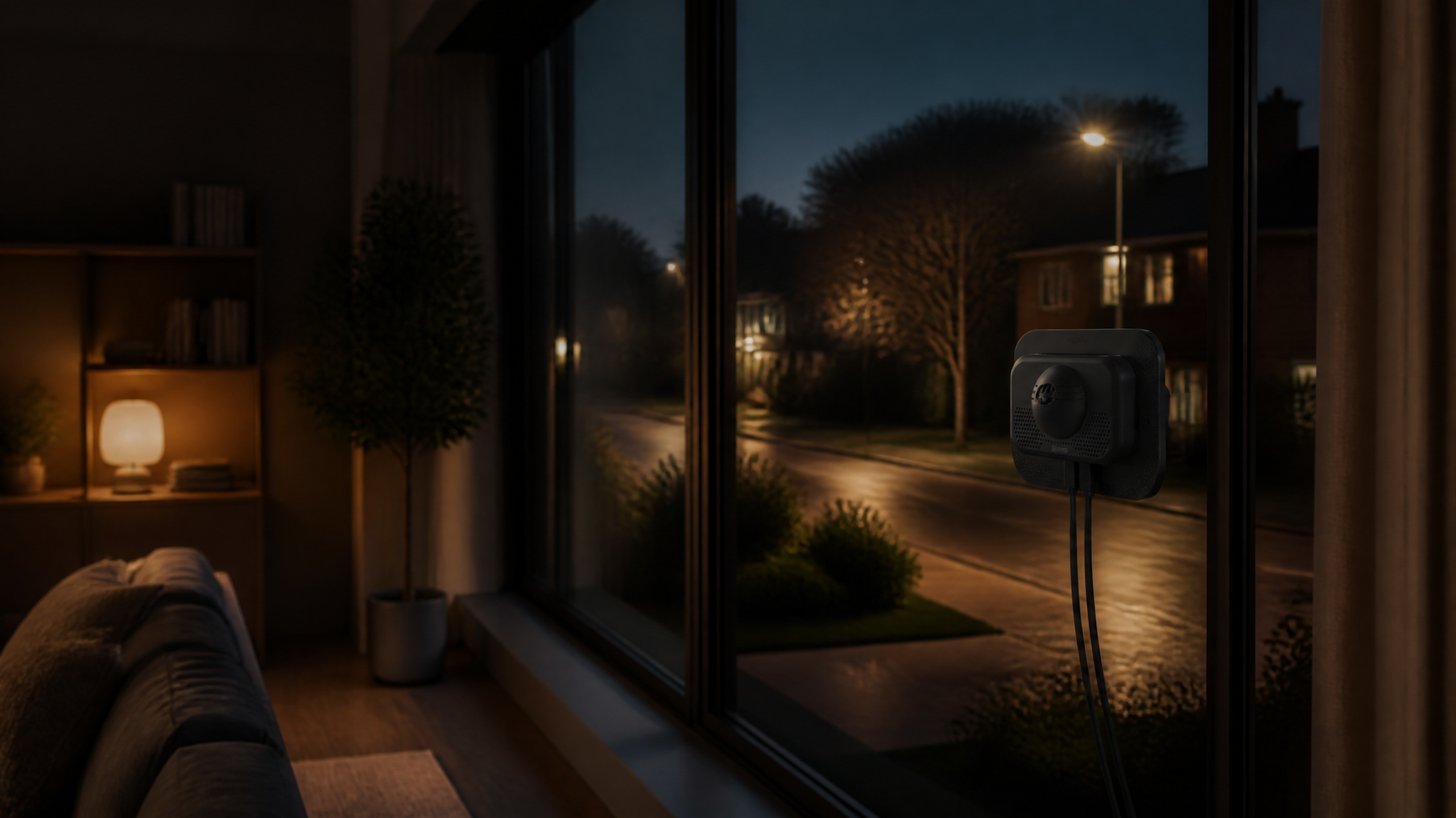
While applying the above techniques is crucial, choosing the right hardware can make all the difference. Many cameras are designed primarily for indoor use or outdoor use, but bridging that gap for discreet window monitoring is where the ShowMo WinEye → truly shines. The WinEye is specifically engineered to address the very glare problems we’ve discussed, offering a sophisticated solution for clear, reflection-free outdoor monitoring from inside your home.
What makes the ShowMo WinEye an exceptional choice for preventing glare on window security cameras at night?
- Dedicated Design for Window Mounting: Unlike generic indoor cameras, the WinEye is built from the ground up for placing against a window. This dedicated design minimizes the air gap and optimizes the lens position for outward viewing.
- Advanced 4K Clarity: Offering crystal-clear 4K resolution, the WinEye ensures that even without IR glare, your footage is sharp and detailed. Higher resolution means more discernible features even at a distance.
- No-Drill Installation: Forget about complicated wiring or drilling holes in your walls. The WinEye’s patented mounting system attaches securely to your window glass, making setup incredibly easy and damage-free.
- Superior Night Vision Without Glare: The WinEye’s design incorporates features that inherently reduce the potential for reflection and optimize for clear night vision through glass. While specific techniques like external IR might still enhance performance, the WinEye is engineered to give you the best possible starting point for reflection-free night recording. Its sophisticated lens and sensor work to maximize available light and minimize internal reflection.
- Discreet & Weatherproof (from inside): Being mounted indoors, the camera is protected from the elements, ensuring longevity, while still providing robust outdoor surveillance. It’s the perfect blend of discreet indoor placement with powerful outdoor monitoring capabilities.
With the ShowMo WinEye, you’re not just buying a camera; you’re investing in a solution specifically designed to overcome the common challenges of window-mounted security, including the dreaded night glare. It empowers homeowners to monitor their property effectively, day or night, without compromising on aesthetics or installation hassle.
FAQs About Window Security Camera Glare
Q1: Can I use any indoor security camera behind a window for outdoor monitoring?
A1: While you *can* physically place many indoor cameras behind a window, you will almost certainly encounter significant glare issues at night due to their built-in IR illuminators reflecting off the glass. Most standard indoor cameras aren’t designed for this specific setup, leading to poor night vision. Cameras like the ShowMo WinEye are purpose-built to overcome these challenges, offering a dedicated solution for clear outdoor monitoring from inside a window.
Q2: Do all “night vision” cameras produce glare when placed behind a window?
A2: Yes, nearly all cameras that rely on onboard infrared (IR) LEDs for night vision will produce glare when those IR lights reflect off a window pane. The key to preventing this is either to disable the camera’s internal IR lights and use an external IR illuminator mounted outside, or to use a camera specifically designed with a different approach to night vision through glass, or a design that mitigates reflection (like the ShowMo WinEye).
Q3: What’s the best way to get clear night vision from my window-mounted camera if I don’t want to drill holes outside?
A3: The absolute best way to achieve clear night vision without glare and without drilling holes externally is to use a camera specifically designed for window placement that either manages internal IR effectively or relies on advanced low-light sensors. Disabling your camera’s internal IR lights is the first step. If you need more illumination, a low-profile external IR illuminator that adheres with strong outdoor-rated adhesive (rather than drilling) could be an option. However, for a truly integrated and optimized solution, a camera like the ShowMo WinEye is engineered to provide excellent 4K night vision performance from behind the glass, reducing the need for extensive workarounds.
Conclusion
The frustration of a window security camera rendered useless by blinding glare at night is a common experience, but it doesn’t have to be your reality. By understanding the causes of reflection – primarily your camera’s internal IR lights – and implementing the right strategies, you can transform your blurry night footage into a clear, reliable security feed. Disabling internal IR, optimizing placement, controlling indoor lighting, and keeping your windows pristine are all vital steps.
For those seeking a truly streamlined and effective solution, investing in a camera specifically engineered for window mounting, like the ShowMo WinEye, can dramatically simplify the process and deliver superior results. Its dedicated design and 4K night vision capabilities are built to provide an optimal window camera glare fix, ensuring your property remains secure and visible, even in the darkest hours. Say goodbye to reflections and hello to peace of mind!